VS Code extension

DevMatrix in your editor

First-class .dmx in VS Code — highlighting, completion, live validation and a Platforms tree — driven by the Pro-plan coding agent you already run: Claude Code, Copilot or Codex. On the Marketplace and Open VSX.
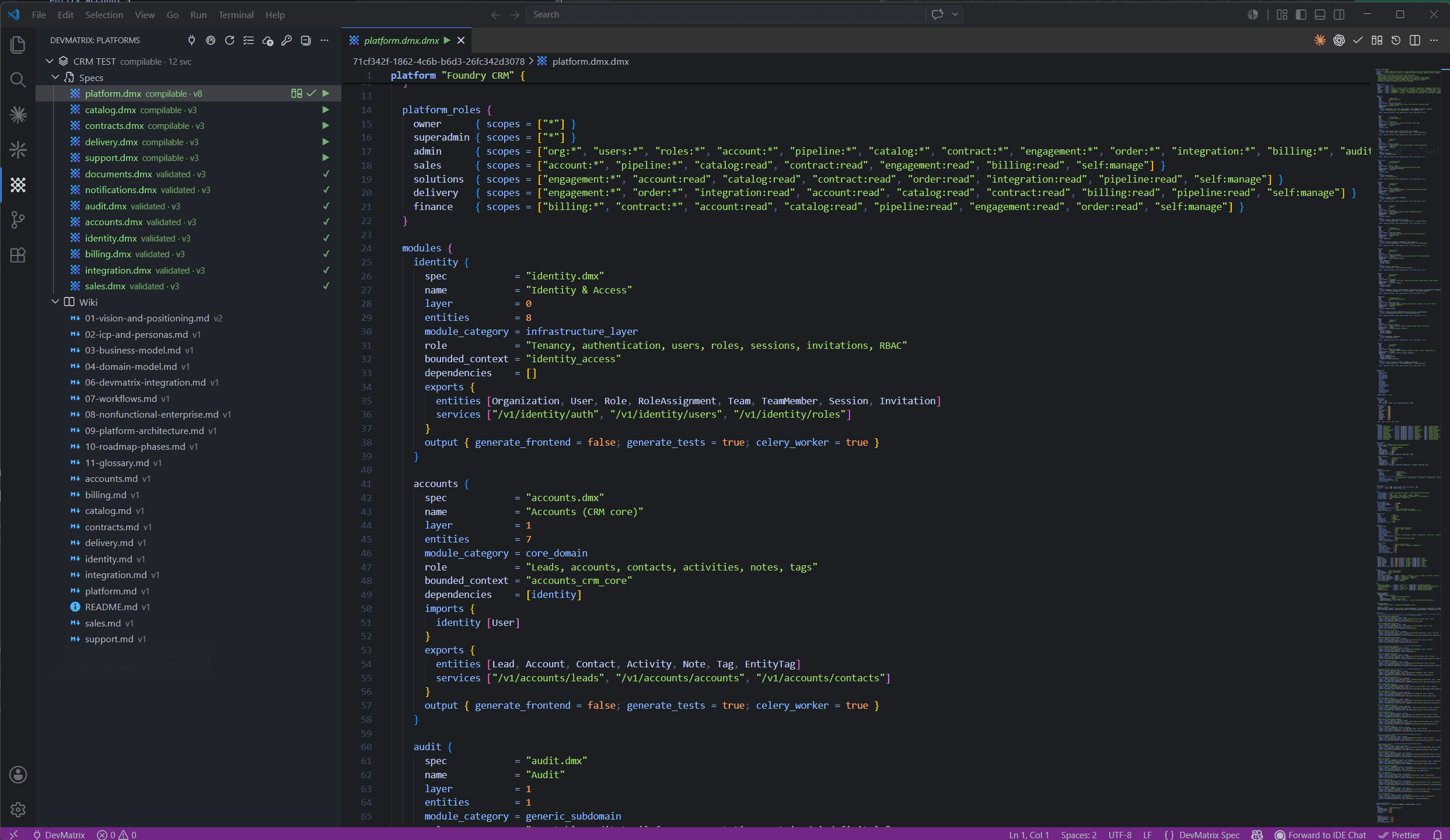
The DevMatrix VS Code extension: a .dmx spec with syntax highlighting, the Platforms tree and live validation
Full DMX language support in VS Code — highlighting, a Platforms tree, and validation as you type.
In the editor

Write valid specs without leaving the keyboard

The same language intelligence as the web Workshop, native to VS Code and your terminal agent.

Syntax highlighting

Rich .dmx highlighting and a DevMatrix Dark theme, kept in lock-step with the web Workshop so your editor and your browser never disagree.

Context-aware completion

Completion for every annotation, token, block, type and keyword in the language — snippet-ready — so you write valid specs without leaving the keyboard.

Live validation

Grammar validation on save plus deep semantic checks as you type, surfaced straight into the native Problems panel with jump-to-error.

Platforms tree

Browse your platforms with status badges, then validate, make-compilable, open version history or diff — all from the sidebar.

Secure sign-in

Sign in with a scoped Workshop key stored in your OS keychain — never in plaintext, never in a dotfile.

Live sync

Platform status refreshes in real time as compiles and validations land, so the tree always reflects the truth.

One-click agent wiring

Connect your coding agent to the DevMatrix MCP in a single command — the extension writes the config for you.

Live DMX reference

Open the canonical language reference and grammar straight from the compiler, inside the editor, always current.

Get started

Up and running in three steps

Install, sign in with a scoped key, and wire your agent.

  1. 1

    Install

    Grab the DevMatrix extension from the VS Code Marketplace or Open VSX.

  2. 2

    Sign in

    Authenticate with your scoped Workshop key — stored safely in your OS keychain.

  3. 3

    Connect your agent

    Wire up Claude Code, Copilot or Codex with one command and start authoring.

Bring DMX to your editor

Install from the VS Code Marketplace or Open VSX and author specs with full language support.